

AI Integration Quick Reference
AI Integration Quick Reference
| Field | Value |
|---|---|
| Package | @cometchat/chat-uikit-angular |
| Key class | CometChatTextFormatter (abstract base class for custom formatters) |
| Required setup | CometChatUIKit.init(uiKitSettings) then CometChatUIKit.login("UID") |
| Purpose | Extend to create custom inline text patterns with regex, styling, and callbacks |
| Features | Text formatting, customizable styles, dynamic text replacement, input field integration, key event callbacks |
| Related | ShortCut Formatter | Mentions Formatter | All Guides |
CometChatTextFormatter is an abstract class for formatting text in the message composer and message bubbles. Extend it to build custom formatters — hashtags, keywords, or any regex-based pattern.
| Capability | Description |
|---|---|
| Text formatting | Auto-format text based on regex patterns and styles |
| Custom styles | Set colors, fonts, and backgrounds for matched text |
| Dynamic replacement | Regex-based find-and-replace in user input |
| Input integration | Real-time monitoring of the composer input field |
| Key event callbacks | Hooks for keyUp and keyDown events |
Always wrap formatted output in a
<span> with a unique CSS class (e.g. "custom-hashtag"). This tells the UI Kit to render it as-is instead of sanitizing it.Steps
1. Import the base class
import { CometChatTextFormatter } from "@cometchat/chat-uikit-angular";
2. Extend it
class HashTagTextFormatter extends CometChatTextFormatter {
  // ...
}
3. Configure tracking character and regex
Set the character that triggers formatting, the regex to match, and the regex to strip formatting back to plain text.this.setTrackingCharacter("#");
this.setRegexPatterns([/\B#(\w+)\b/g]);
this.setRegexToReplaceFormatting([
/<span class="custom-hashtag" style="color: #30b3ff;">#(\w+)<\/span>/g,
]);
4. Set key event callbacks
this.setKeyUpCallBack(this.onKeyUp.bind(this));
this.setKeyDownCallBack(this.onKeyDown.bind(this));
5. Implement formatting methods
getFormattedText(inputText: string) { /* ... */ }
getOriginalText(inputText: string) { /* ... */ }
customLogicToFormatText(inputText: string) { /* ... */ }
Example
A hashtag formatter used withcometchat-message-list and cometchat-message-composer.
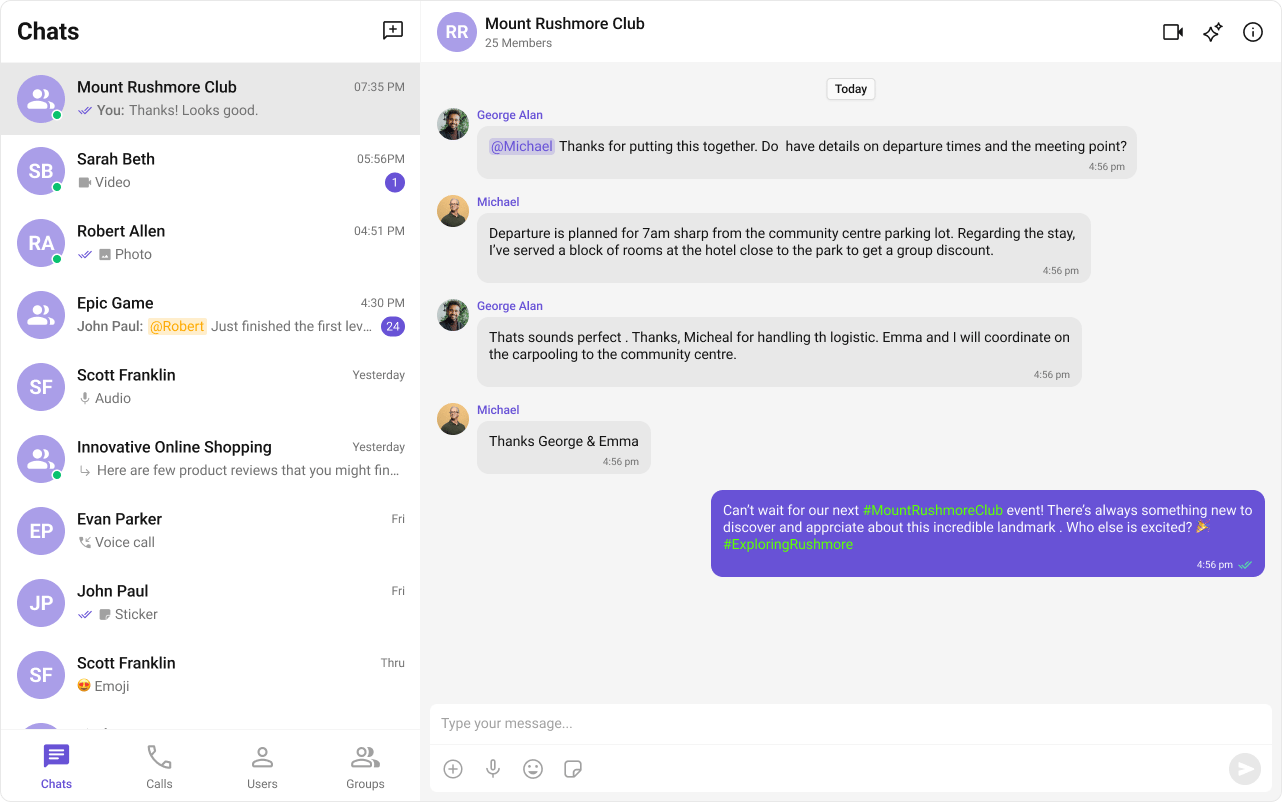
- HashTagTextFormatter.ts
- Component Usage
import { CometChatTextFormatter } from "@cometchat/chat-uikit-angular";

export class HashTagTextFormatter extends CometChatTextFormatter {
  constructor() {
    super();
    this.setTrackingCharacter("#");
    this.setRegexPatterns([/\B#(\w+)\b/g]);
    this.setRegexToReplaceFormatting([/#(\w+)/g]);
    this.setKeyUpCallBack(this.onKeyUp.bind(this));
    this.setKeyDownCallBack(this.onKeyDown.bind(this));
    this.setReRender(() => {
      console.log("Re-rendering message composer to update text content.");
    });
  }

  getCaretPosition(): number {
    if (!this.inputElementReference) return 0;
    const selection = window.getSelection();
    if (!selection || selection.rangeCount === 0) return 0;
    const range = selection.getRangeAt(0);
    const clonedRange = range.cloneRange();
    clonedRange.selectNodeContents(this.inputElementReference);
    clonedRange.setEnd(range.endContainer, range.endOffset);
    return clonedRange.toString().length;
  }

  setCaretPosition(position: number) {
    if (!this.inputElementReference) return;
    const range = document.createRange();
    const selection = window.getSelection();
    if (!selection) return;
    range.setStart(
      this.inputElementReference.childNodes[0] || this.inputElementReference,
      position
    );
    range.collapse(true);
    selection.removeAllRanges();
    selection.addRange(range);
  }

  onKeyUp(event: KeyboardEvent) {
    if (event.key === this.trackCharacter) {
      this.startTracking = true;
    }
    if (this.startTracking && (event.key === " " || event.key === "Enter")) {
      const caretPosition = this.getCaretPosition();
      this.formatText();
      this.setCaretPosition(caretPosition);
    }
    if (
      this.startTracking &&
      event.key !== " " &&
      event.key !== "Enter" &&
      this.getCaretPosition() === this.inputElementReference?.innerText?.length
    ) {
      this.startTracking = false;
    }
  }

  formatText() {
    const inputValue =
      this.inputElementReference?.innerText ||
      this.inputElementReference?.textContent ||
      "";
    const formattedText = this.getFormattedText(inputValue);
    if (this.inputElementReference) {
      this.inputElementReference.innerHTML = formattedText || "";
      this.reRender();
    }
  }

  onKeyDown(event: KeyboardEvent) {}

  getFormattedText(inputText: string) {
    if (!inputText) return;
    return this.customLogicToFormatText(inputText);
  }

  customLogicToFormatText(inputText: string) {
    return inputText.replace(
      /\B#(\w+)\b/g,
      '<span class="custom-hashtag" style="color: #5dff05;">#$1</span>'
    );
  }

  getOriginalText(inputText: string) {
    if (!inputText) return "";
    for (let i = 0; i < this.regexToReplaceFormatting.length; i++) {
      const regexPattern = this.regexToReplaceFormatting[i];
      if (inputText) {
        inputText = inputText.replace(regexPattern, "#$1");
      }
    }
    return inputText;
  }
}
Pass the formatter via the
textFormatters input on the message list and composer.import { Component, OnInit } from "@angular/core";
import { CometChat } from "@cometchat/chat-sdk-javascript";
import { CometChatMessageListComponent, CometChatMessageComposerComponent } from "@cometchat/chat-uikit-angular";
import { HashTagTextFormatter } from "./HashTagTextFormatter";
@Component({
selector: "app-message-demo",
standalone: true,
imports: [CometChatMessageListComponent, CometChatMessageComposerComponent],
template: `
<cometchat-message-list
[user]="chatUser"
[textFormatters]="textFormatters">
</cometchat-message-list>
<cometchat-message-composer
[user]="chatUser"
[textFormatters]="textFormatters">
</cometchat-message-composer>
`,
})
export class MessageDemoComponent implements OnInit {
chatUser: CometChat.User | undefined;
textFormatters = [new HashTagTextFormatter()];
ngOnInit() {
CometChat.getUser("uid").then((user) => {
this.chatUser = user;
});
}
}
Methods Reference
| Field | Setter | Description |
|---|---|---|
trackCharacter | setTrackingCharacter(char) | Character that starts tracking (e.g. # for hashtags) |
currentCaretPosition | setCaretPositionAndRange(selection, range) | Current selection set by the composer |
currentRange | setCaretPositionAndRange(selection, range) | Text range or cursor position set by the composer |
inputElementReference | setInputElementReference(element) | DOM reference to the composer input field |
regexPatterns | setRegexPatterns(patterns) | Regex patterns to match text for formatting |
regexToReplaceFormatting | setRegexToReplaceFormatting(patterns) | Regex patterns to strip formatting back to plain text |
keyUpCallBack | setKeyUpCallBack(fn) | Callback for key up events |
keyDownCallBack | setKeyDownCallBack(fn) | Callback for key down events |
reRender | setReRender(fn) | Triggers a re-render of the composer to update displayed text |
loggedInUser | setLoggedInUser(user) | Logged-in user object, set by composer and text bubbles |
id | setId(id) | Unique identifier for the formatter instance |
Don’t modify
textContent or innerHTML of the input element directly. Call reRender instead — the composer will invoke getFormattedText for all formatters in order.Override Methods
- getFormattedText
- onKeyUp
- onKeyDown
- getOriginalText
Returns formatted HTML from input text, or edits at cursor position if
inputText is null.getFormattedText(inputText: string | null, params: any): string | void {
if (!inputText) {
return; // edit at cursor position
}
return this.customLogicToFormatText(inputText);
}
Handles
keyup events. Start tracking when the track character is typed.onKeyUp(event: KeyboardEvent) {
if (event.key === this.trackCharacter) {
this.startTracking = true;
}
if (this.startTracking && event.key === " ") {
this.debouncedFormatTextOnKeyUp();
}
}
Handles
keydown events.onKeyDown(event: KeyboardEvent) {}
Strips formatting and returns plain text.
getOriginalText(inputText: string | null | undefined): string {
  if (!inputText) return "";
  for (let i = 0; i < this.regexToReplaceFormatting.length; i++) {
    const regexPattern = this.regexToReplaceFormatting[i];
    if (inputText) {
      inputText = inputText.replace(regexPattern, "$1");
    }
  }
  return inputText;
}
Next Steps
Mentions Formatter
Add @mentions with styled tokens.
Message Composer
Customize the message input component.
All Guides
Browse all feature and formatter guides.
ShortCut Formatter
Implement text expansion shortcuts.