> ## Documentation Index
> Fetch the complete documentation index at: https://cometchat-22654f5b-docs-v6-beta2-flutter-uikit.mintlify.site/llms.txt
> Use this file to discover all available pages before exploring further.
# ShortCut Formatter
> Implement !shortcut style text expansions with extension APIs or dialogs in CometChat Angular UI Kit.
| Field | Value |
| --------------- | ---------------------------------------------------------------------------------------------------------------------------- |
| Package | `@cometchat/chat-uikit-angular` |
| Key class | `ShortcutFormatter` (extends `CometChatTextFormatter`) |
| Required setup | `CometChatUIKit.init(uiKitSettings)` then `CometChatUIKit.login("UID")` |
| Track character | `!` — triggers shortcut expansion in the message composer |
| Related | [Custom Text Formatter](/ui-kit/angular/v5/guides/custom-text-formatter) \| [All Guides](/ui-kit/angular/v5/guides/overview) |
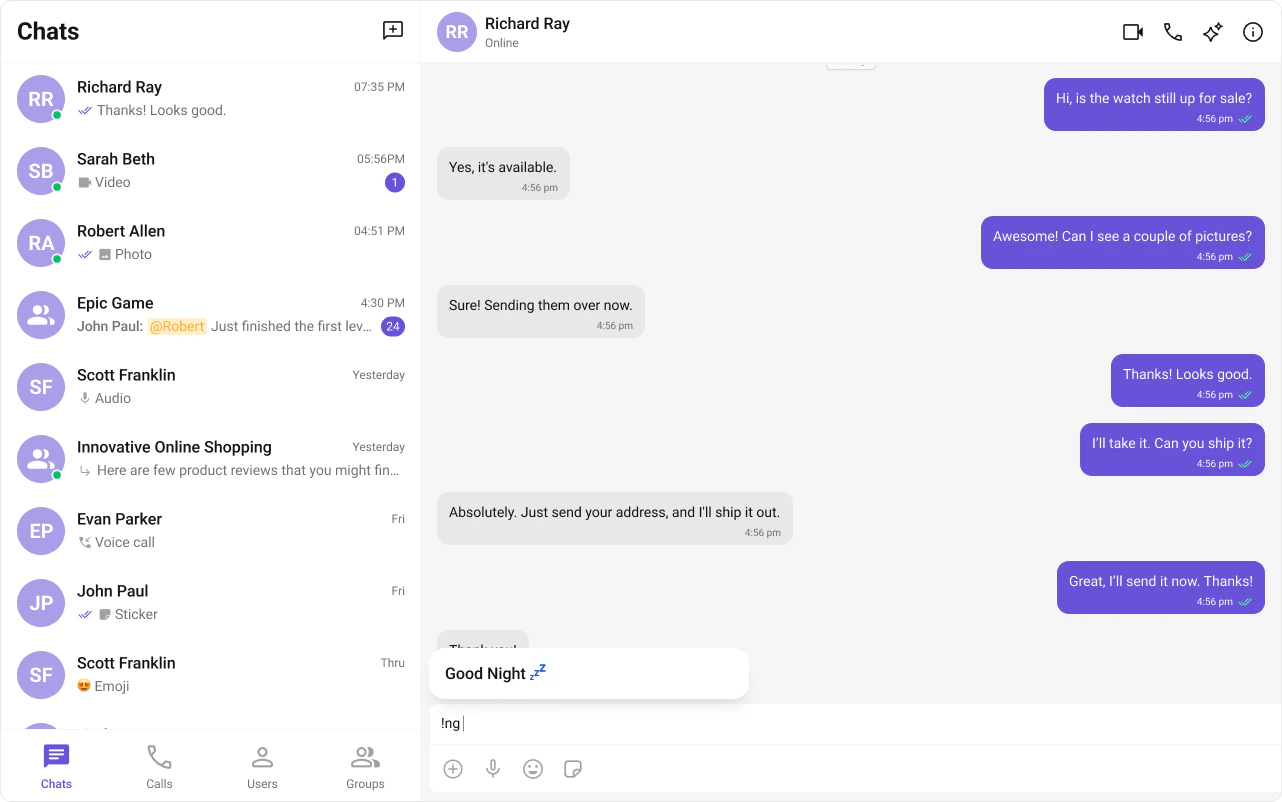
`ShortCutFormatter` extends [CometChatTextFormatter](/ui-kit/angular/v5/guides/custom-text-formatter) to expand shortcodes (like `!hb`) into full text via the Message Shortcuts extension. When a user types a shortcut, a dialog appears with the expansion — clicking it inserts the text.
 ***
## Steps
### 1. Import the base class
```typescript theme={null}
import { CometChatTextFormatter } from "@cometchat/chat-uikit-angular";
```
### 2. Extend it
```typescript theme={null}
class ShortCutFormatter extends CometChatTextFormatter {
// ...
}
```
### 3. Set the track character
```typescript theme={null}
this.setTrackingCharacter("!");
```
### 4. Handle key events
Detect shortcuts on `keyUp` and trigger expansion logic.
```typescript theme={null}
onKeyUp(event: KeyboardEvent) {
// Check text before caret for shortcut match
}
```
### 5. Add dialog and formatting methods
```typescript theme={null}
openDialog(buttonText: string, shortcut: string) { /* ... */ }
closeDialog() { /* ... */ }
handleButtonClick(buttonText: string) { /* ... */ }
getFormattedText(text: string): string { return text; }
```
***
## Example
***
## Steps
### 1. Import the base class
```typescript theme={null}
import { CometChatTextFormatter } from "@cometchat/chat-uikit-angular";
```
### 2. Extend it
```typescript theme={null}
class ShortCutFormatter extends CometChatTextFormatter {
// ...
}
```
### 3. Set the track character
```typescript theme={null}
this.setTrackingCharacter("!");
```
### 4. Handle key events
Detect shortcuts on `keyUp` and trigger expansion logic.
```typescript theme={null}
onKeyUp(event: KeyboardEvent) {
// Check text before caret for shortcut match
}
```
### 5. Add dialog and formatting methods
```typescript theme={null}
openDialog(buttonText: string, shortcut: string) { /* ... */ }
closeDialog() { /* ... */ }
handleButtonClick(buttonText: string) { /* ... */ }
getFormattedText(text: string): string { return text; }
```
***
## Example
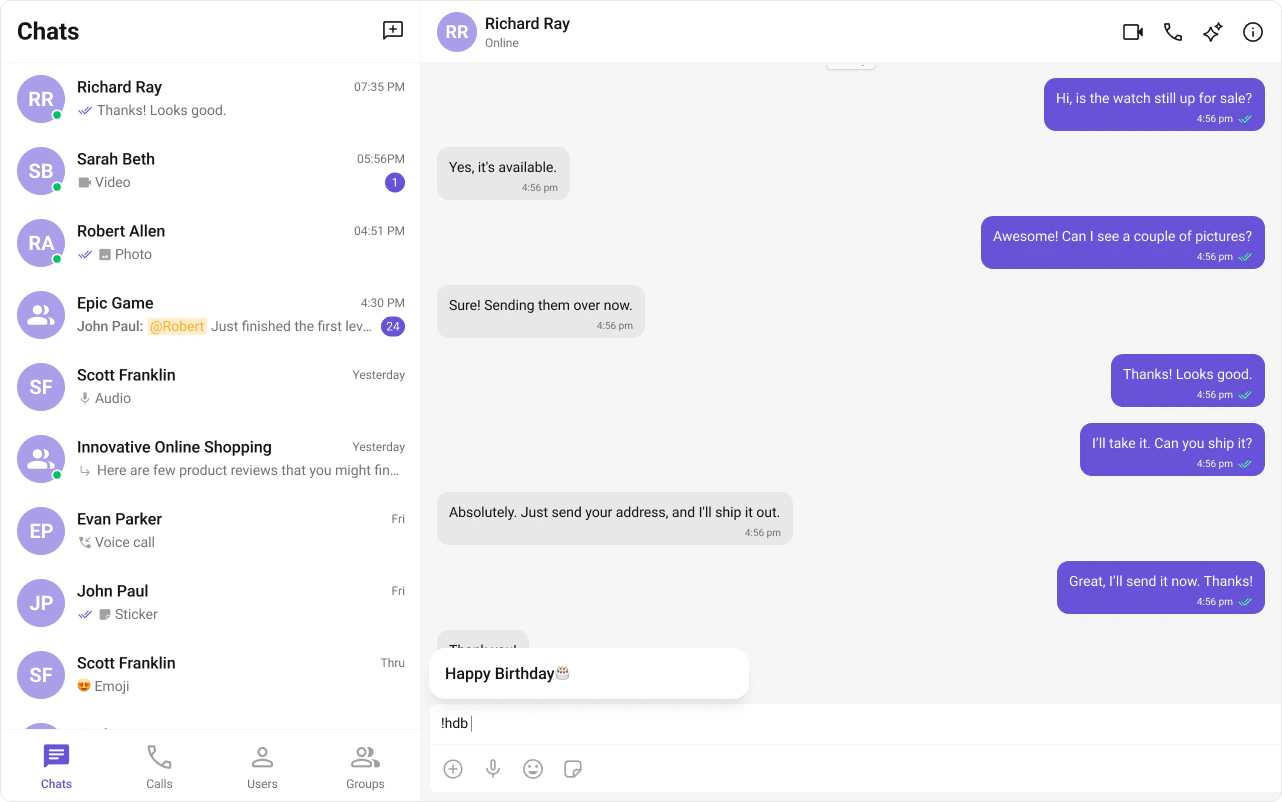
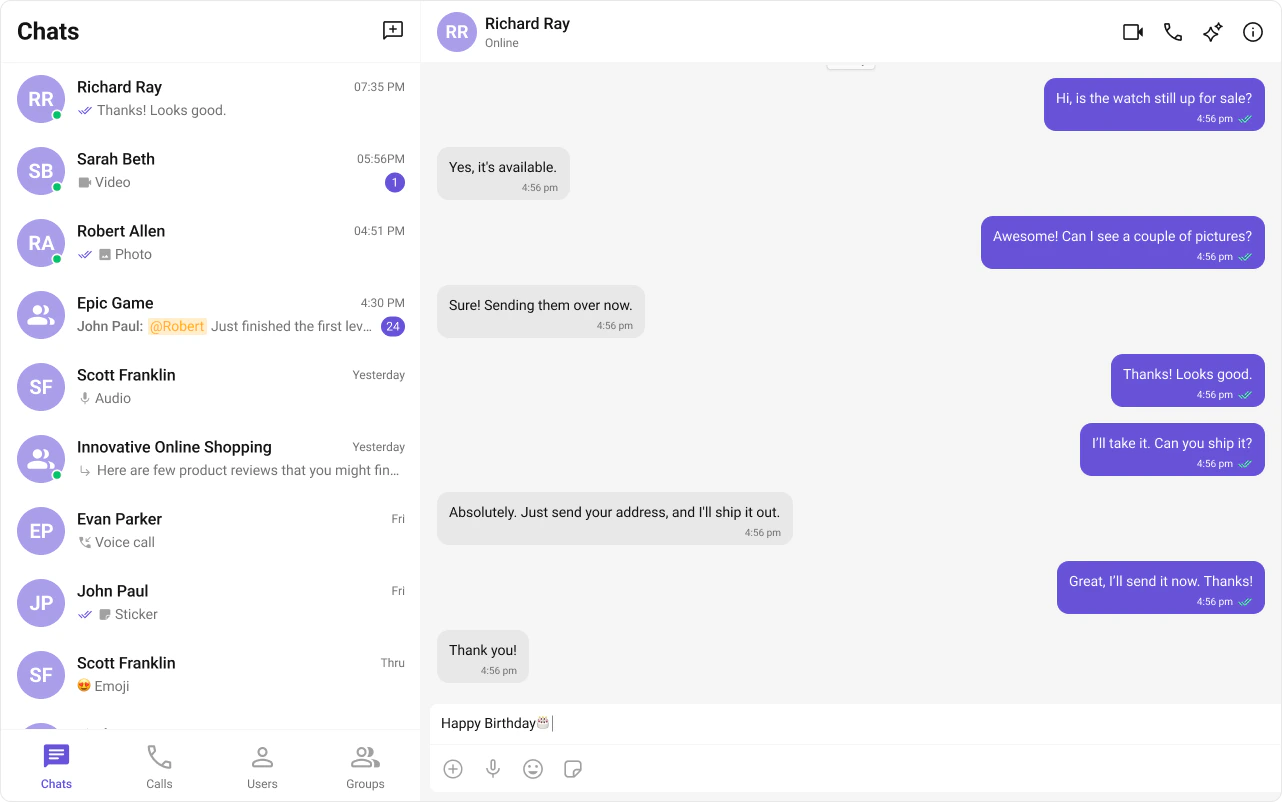 Fetches shortcuts from the Message Shortcuts extension on init. On `keyUp`, checks if the text before the caret matches a shortcut and opens a dialog with the expansion.
```typescript expandable theme={null}
import { CometChatTextFormatter, CometChatUIEvents, PanelAlignment } from "@cometchat/chat-uikit-angular";
import { CometChat } from "@cometchat/chat-sdk-javascript";
export class ShortcutFormatter extends CometChatTextFormatter {
private shortcuts: { [key: string]: string } = {};
private dialogIsOpen = false;
private currentShortcut: string | null = null;
constructor() {
super();
this.setTrackingCharacter("!");
CometChat.callExtension("message-shortcuts", "GET", "v1/fetch", undefined)
.then((data: any) => {
if (data?.shortcuts) {
this.shortcuts = data.shortcuts;
}
})
.catch((error) => console.error("Error fetching shortcuts", error));
}
onKeyUp(event: KeyboardEvent) {
const caretPosition =
this.currentCaretPosition instanceof Selection
? this.currentCaretPosition.anchorOffset
: 0;
const textBeforeCaret = this.getTextBeforeCaret(caretPosition);
const match = textBeforeCaret.match(/!([a-zA-Z]+)$/);
if (match) {
const shortcut = match[0];
const replacement = this.shortcuts[shortcut];
if (replacement) {
if (this.dialogIsOpen && this.currentShortcut !== shortcut) {
this.closeDialog();
}
this.openDialog(replacement, shortcut);
}
} else if (!textBeforeCaret) {
this.closeDialog();
}
}
openDialog(buttonText: string, shortcut: string) {
CometChatUIEvents.ccShowPanel.next({
child: this.createDialogElement(buttonText),
position: PanelAlignment.messageListFooter,
});
this.dialogIsOpen = true;
this.currentShortcut = shortcut;
}
closeDialog() {
CometChatUIEvents.ccHidePanel.next(PanelAlignment.messageListFooter);
this.dialogIsOpen = false;
this.currentShortcut = null;
}
private createDialogElement(buttonText: string): HTMLElement {
const container = document.createElement("div");
container.style.width = "100%";
container.style.padding = "8px";
const button = document.createElement("button");
button.textContent = buttonText;
button.style.cssText =
"width: 100%; padding: 8px 16px; cursor: pointer; background: #f2e6ff; border: 2px solid #9b42f5; border-radius: 12px; text-align: left; font: 600 15px sans-serif;";
button.addEventListener("click", () => this.handleButtonClick(buttonText));
container.appendChild(button);
return container;
}
handleButtonClick(buttonText: string) {
if (this.currentCaretPosition && this.currentRange) {
const shortcut = Object.keys(this.shortcuts).find(
(key) => this.shortcuts[key] === buttonText
);
if (shortcut) {
const replacement = this.shortcuts[shortcut];
this.addAtCaretPosition(
replacement,
this.currentCaretPosition,
this.currentRange
);
}
}
if (this.dialogIsOpen) {
this.closeDialog();
}
}
getFormattedText(text: string): string {
return text;
}
private getTextBeforeCaret(caretPosition: number): string {
if (
this.currentRange?.startContainer &&
typeof this.currentRange.startContainer.textContent === "string"
) {
const textContent = this.currentRange.startContainer.textContent;
if (textContent.length >= caretPosition) {
return textContent.substring(0, caretPosition);
}
}
return "";
}
}
```
Pass the formatter via the `textFormatters` input on the composer.
```typescript expandable theme={null}
import { Component } from "@angular/core";
import { CometChatMessageComposerComponent } from "@cometchat/chat-uikit-angular";
import { ShortcutFormatter } from "./ShortCutFormatter";
@Component({
selector: "app-shortcut-demo",
standalone: true,
imports: [CometChatMessageComposerComponent],
template: `
`,
})
export class ShortcutDemoComponent {
textFormatters = [new ShortcutFormatter()];
}
```
The Message Shortcuts extension must be enabled in your CometChat Dashboard for this formatter to work. Configure your shortcuts in the Dashboard under Extensions → Message Shortcuts.
***
## Next Steps
Build custom inline text patterns.
Customize the message input component.
Browse all feature and formatter guides.
Add @mentions with styled tokens.
Fetches shortcuts from the Message Shortcuts extension on init. On `keyUp`, checks if the text before the caret matches a shortcut and opens a dialog with the expansion.
```typescript expandable theme={null}
import { CometChatTextFormatter, CometChatUIEvents, PanelAlignment } from "@cometchat/chat-uikit-angular";
import { CometChat } from "@cometchat/chat-sdk-javascript";
export class ShortcutFormatter extends CometChatTextFormatter {
private shortcuts: { [key: string]: string } = {};
private dialogIsOpen = false;
private currentShortcut: string | null = null;
constructor() {
super();
this.setTrackingCharacter("!");
CometChat.callExtension("message-shortcuts", "GET", "v1/fetch", undefined)
.then((data: any) => {
if (data?.shortcuts) {
this.shortcuts = data.shortcuts;
}
})
.catch((error) => console.error("Error fetching shortcuts", error));
}
onKeyUp(event: KeyboardEvent) {
const caretPosition =
this.currentCaretPosition instanceof Selection
? this.currentCaretPosition.anchorOffset
: 0;
const textBeforeCaret = this.getTextBeforeCaret(caretPosition);
const match = textBeforeCaret.match(/!([a-zA-Z]+)$/);
if (match) {
const shortcut = match[0];
const replacement = this.shortcuts[shortcut];
if (replacement) {
if (this.dialogIsOpen && this.currentShortcut !== shortcut) {
this.closeDialog();
}
this.openDialog(replacement, shortcut);
}
} else if (!textBeforeCaret) {
this.closeDialog();
}
}
openDialog(buttonText: string, shortcut: string) {
CometChatUIEvents.ccShowPanel.next({
child: this.createDialogElement(buttonText),
position: PanelAlignment.messageListFooter,
});
this.dialogIsOpen = true;
this.currentShortcut = shortcut;
}
closeDialog() {
CometChatUIEvents.ccHidePanel.next(PanelAlignment.messageListFooter);
this.dialogIsOpen = false;
this.currentShortcut = null;
}
private createDialogElement(buttonText: string): HTMLElement {
const container = document.createElement("div");
container.style.width = "100%";
container.style.padding = "8px";
const button = document.createElement("button");
button.textContent = buttonText;
button.style.cssText =
"width: 100%; padding: 8px 16px; cursor: pointer; background: #f2e6ff; border: 2px solid #9b42f5; border-radius: 12px; text-align: left; font: 600 15px sans-serif;";
button.addEventListener("click", () => this.handleButtonClick(buttonText));
container.appendChild(button);
return container;
}
handleButtonClick(buttonText: string) {
if (this.currentCaretPosition && this.currentRange) {
const shortcut = Object.keys(this.shortcuts).find(
(key) => this.shortcuts[key] === buttonText
);
if (shortcut) {
const replacement = this.shortcuts[shortcut];
this.addAtCaretPosition(
replacement,
this.currentCaretPosition,
this.currentRange
);
}
}
if (this.dialogIsOpen) {
this.closeDialog();
}
}
getFormattedText(text: string): string {
return text;
}
private getTextBeforeCaret(caretPosition: number): string {
if (
this.currentRange?.startContainer &&
typeof this.currentRange.startContainer.textContent === "string"
) {
const textContent = this.currentRange.startContainer.textContent;
if (textContent.length >= caretPosition) {
return textContent.substring(0, caretPosition);
}
}
return "";
}
}
```
Pass the formatter via the `textFormatters` input on the composer.
```typescript expandable theme={null}
import { Component } from "@angular/core";
import { CometChatMessageComposerComponent } from "@cometchat/chat-uikit-angular";
import { ShortcutFormatter } from "./ShortCutFormatter";
@Component({
selector: "app-shortcut-demo",
standalone: true,
imports: [CometChatMessageComposerComponent],
template: `
`,
})
export class ShortcutDemoComponent {
textFormatters = [new ShortcutFormatter()];
}
```
The Message Shortcuts extension must be enabled in your CometChat Dashboard for this formatter to work. Configure your shortcuts in the Dashboard under Extensions → Message Shortcuts.
***
## Next Steps
Build custom inline text patterns.
Customize the message input component.
Browse all feature and formatter guides.
Add @mentions with styled tokens.