> ## Documentation Index
> Fetch the complete documentation index at: https://cometchat-22654f5b-docs-v6-beta2-flutter-uikit.mintlify.site/llms.txt
> Use this file to discover all available pages before exploring further.
# Core Features
> Map of CometChat's core chat features to the Angular UIKit components that power each one — instant messaging, media sharing, read receipts, typing indicators, user presence, reactions, mentions, threaded conversations, search, and moderation.
The Angular UIKit components work together to deliver a complete chat experience. The sections below map each core feature to the components that implement it, so you can quickly find the right building block for any capability.
## Instant Messaging
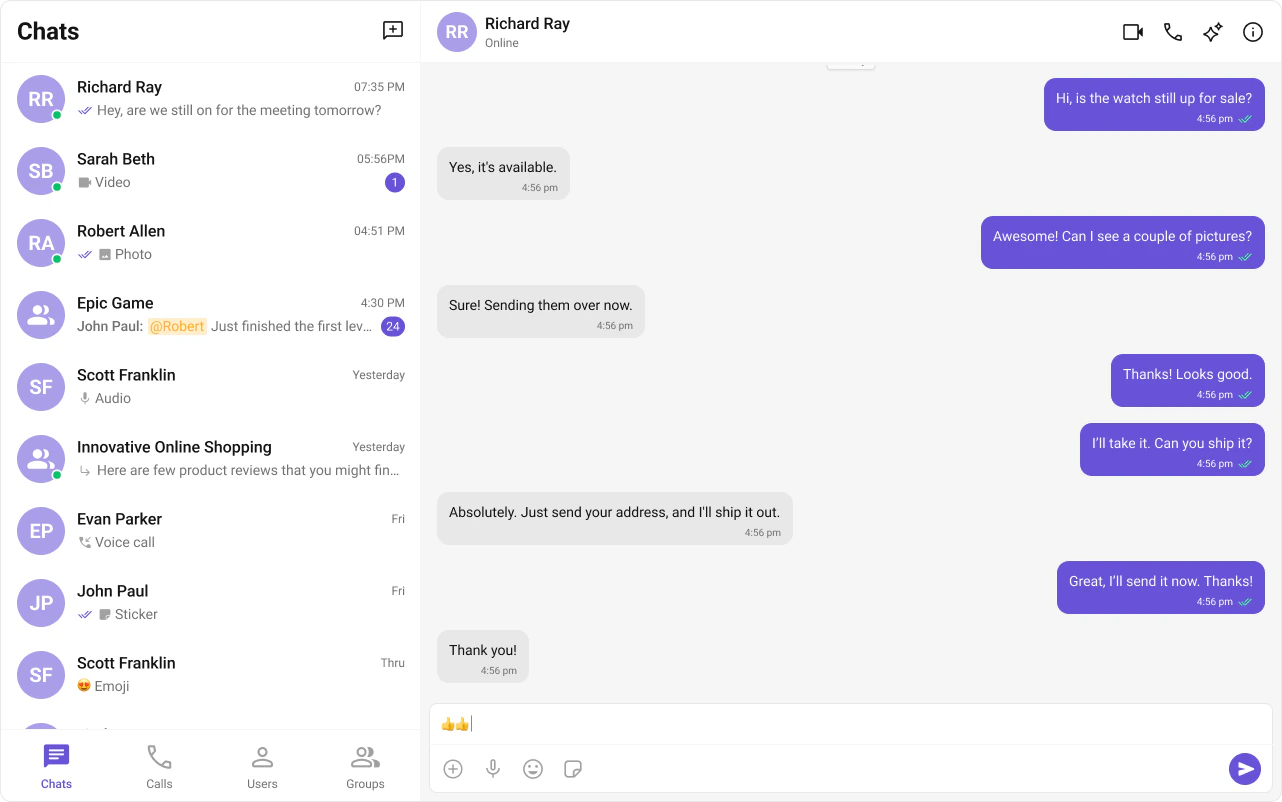
Real-time text messaging is at the heart of CometChat. Users can send and receive instant messages, enabling quick and efficient communication in both one-on-one and group conversations.
 | Component | Functionality |
| -------------------------------------------------------------------------------------- | -------------------------------------------------------------------------------- |
| [cometchat-message-composer](/ui-kit/angular/v5/components/cometchat-message-composer) | Provides the input area where users write and send text messages. |
| [cometchat-message-list](/ui-kit/angular/v5/components/cometchat-message-list) | Renders the chronological list of sent and received messages using text bubbles. |
## Media Sharing
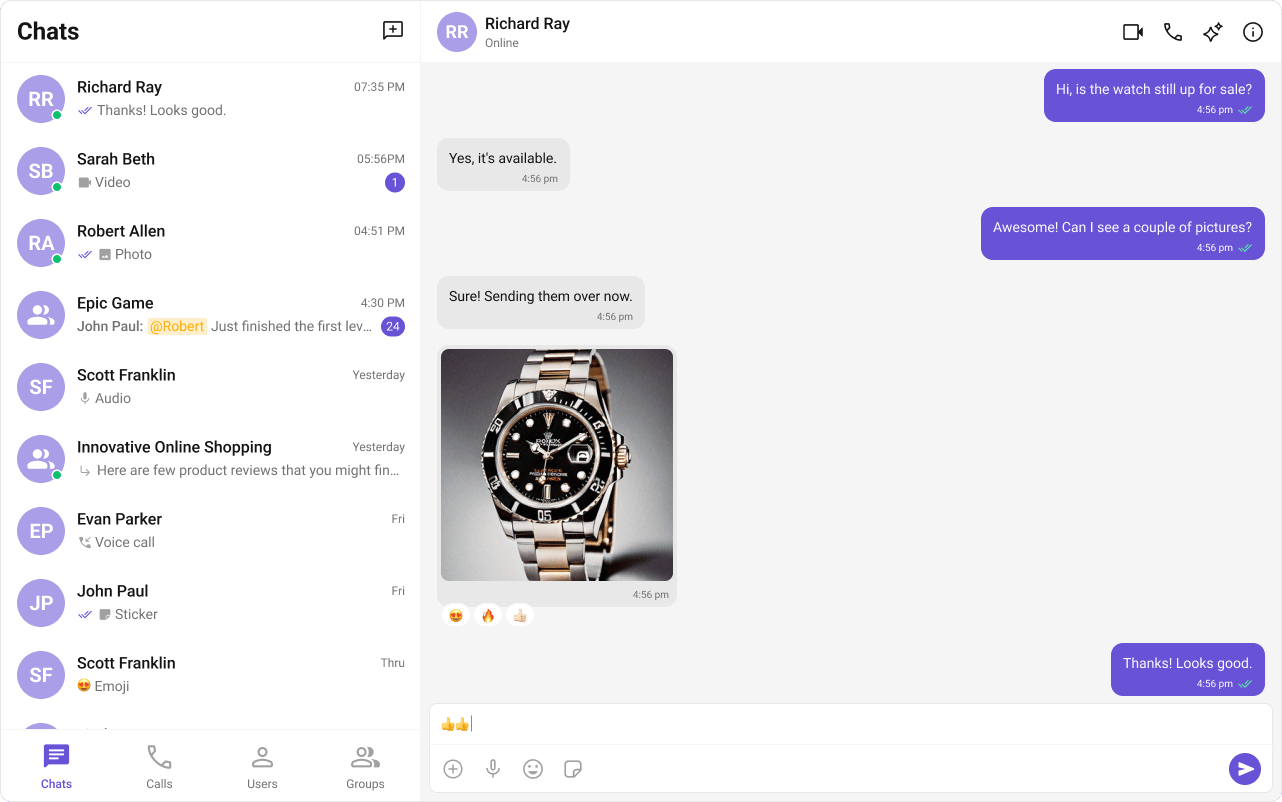
CometChat supports sharing images, videos, audio files, and documents within conversations.
| Component | Functionality |
| -------------------------------------------------------------------------------------- | -------------------------------------------------------------------------------- |
| [cometchat-message-composer](/ui-kit/angular/v5/components/cometchat-message-composer) | Provides the input area where users write and send text messages. |
| [cometchat-message-list](/ui-kit/angular/v5/components/cometchat-message-list) | Renders the chronological list of sent and received messages using text bubbles. |
## Media Sharing
CometChat supports sharing images, videos, audio files, and documents within conversations.
 | Component | Functionality |
| -------------------------------------------------------------------------------------- | ------------------------------------------------------------------------------------ |
| [cometchat-message-composer](/ui-kit/angular/v5/components/cometchat-message-composer) | Includes an ActionSheet that presents options for attaching and sharing media files. |
| [cometchat-message-list](/ui-kit/angular/v5/components/cometchat-message-list) | Renders media message bubbles including Image, File, Audio, and Video bubbles. |
## Read Receipts
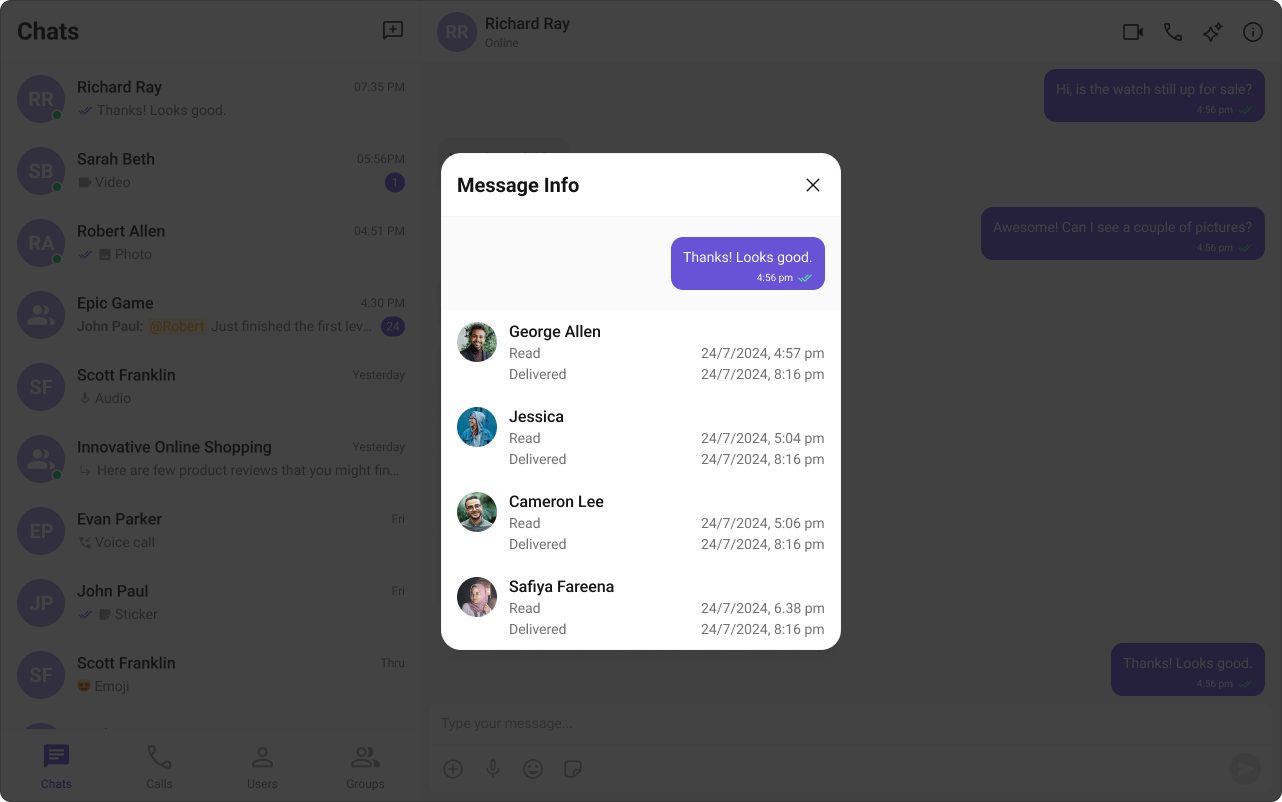
Read Receipts provide visibility into message status, letting users know when a message has been delivered and read. This brings clarity to communication and sets expectations about engagement.
| Component | Functionality |
| -------------------------------------------------------------------------------------- | ------------------------------------------------------------------------------------ |
| [cometchat-message-composer](/ui-kit/angular/v5/components/cometchat-message-composer) | Includes an ActionSheet that presents options for attaching and sharing media files. |
| [cometchat-message-list](/ui-kit/angular/v5/components/cometchat-message-list) | Renders media message bubbles including Image, File, Audio, and Video bubbles. |
## Read Receipts
Read Receipts provide visibility into message status, letting users know when a message has been delivered and read. This brings clarity to communication and sets expectations about engagement.
 | Component | Functionality |
| -------------------------------------------------------------------------------------------- | ------------------------------------------------------------------------------------------ |
| [cometchat-conversations](/ui-kit/angular/v5/components/cometchat-conversations) | Displays the delivery and read status of the last message in each conversation list item. |
| [cometchat-message-list](/ui-kit/angular/v5/components/cometchat-message-list) | Shows read receipt indicators on every message bubble, providing real-time status updates. |
| [cometchat-message-information](/ui-kit/angular/v5/components/cometchat-message-information) | Gives the sender detailed insights into whether their message has been delivered and read. |
## Typing Indicator
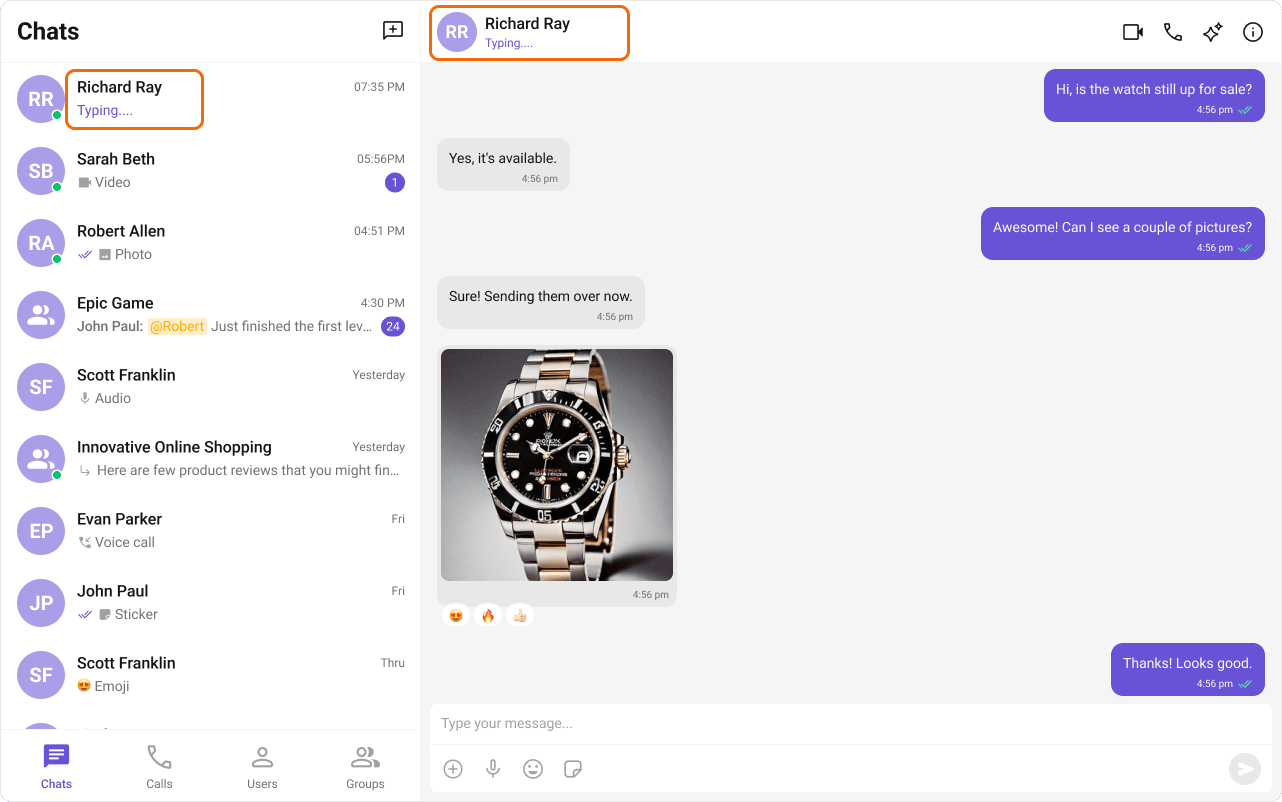
The Typing Indicator shows when a user is composing a response in real time, making conversations feel more natural and interactive.
| Component | Functionality |
| -------------------------------------------------------------------------------------------- | ------------------------------------------------------------------------------------------ |
| [cometchat-conversations](/ui-kit/angular/v5/components/cometchat-conversations) | Displays the delivery and read status of the last message in each conversation list item. |
| [cometchat-message-list](/ui-kit/angular/v5/components/cometchat-message-list) | Shows read receipt indicators on every message bubble, providing real-time status updates. |
| [cometchat-message-information](/ui-kit/angular/v5/components/cometchat-message-information) | Gives the sender detailed insights into whether their message has been delivered and read. |
## Typing Indicator
The Typing Indicator shows when a user is composing a response in real time, making conversations feel more natural and interactive.
 | Component | Functionality |
| ---------------------------------------------------------------------------------- | -------------------------------------------------------------------------------------------------------- |
| [cometchat-conversations](/ui-kit/angular/v5/components/cometchat-conversations) | Shows real-time typing status indicators in conversation list items for both one-on-one and group chats. |
| [cometchat-message-header](/ui-kit/angular/v5/components/cometchat-message-header) | Dynamically updates to display a "typing…" status when a user or group member is composing a message. |
## User Presence
User Presence lets users see whether their contacts are online or offline, helping them choose the best time to start a conversation.
| Component | Functionality |
| ---------------------------------------------------------------------------------- | -------------------------------------------------------------------------------------------------------- |
| [cometchat-conversations](/ui-kit/angular/v5/components/cometchat-conversations) | Shows real-time typing status indicators in conversation list items for both one-on-one and group chats. |
| [cometchat-message-header](/ui-kit/angular/v5/components/cometchat-message-header) | Dynamically updates to display a "typing…" status when a user or group member is composing a message. |
## User Presence
User Presence lets users see whether their contacts are online or offline, helping them choose the best time to start a conversation.
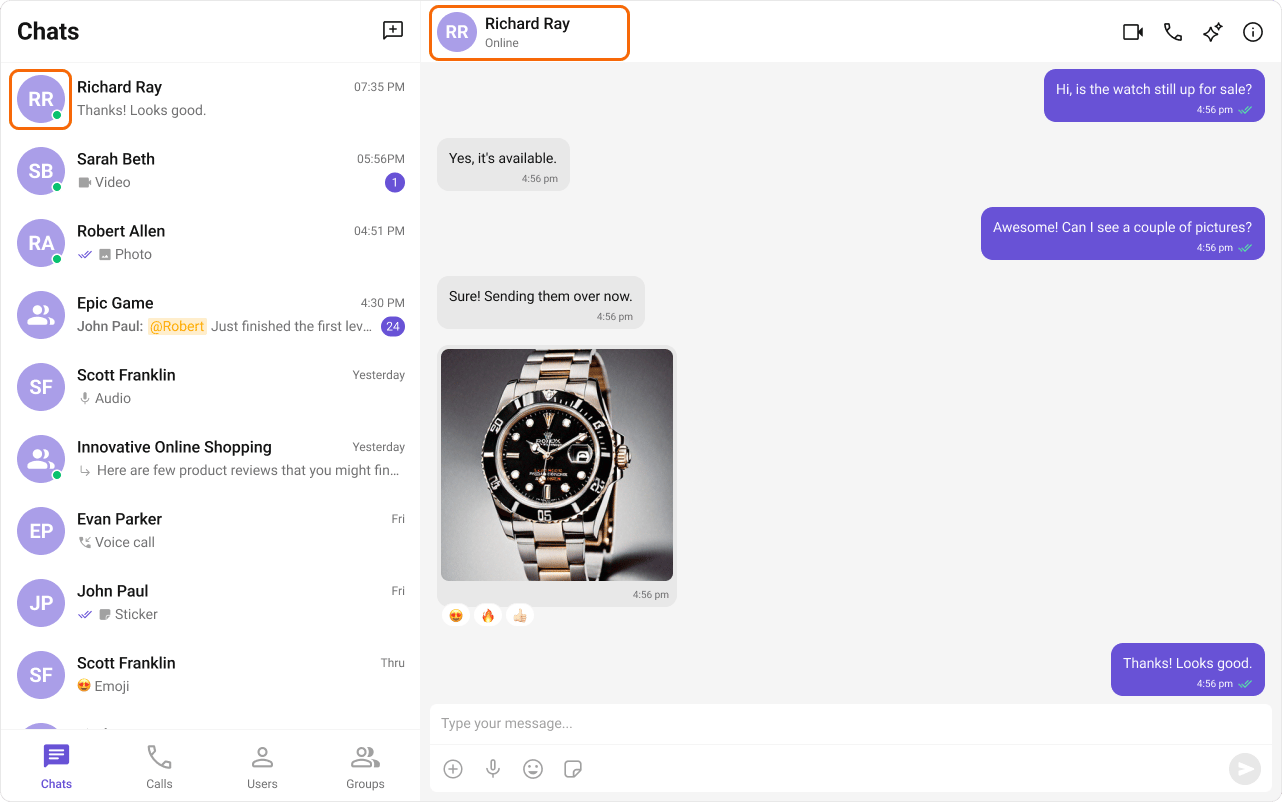 | Component | Functionality |
| ---------------------------------------------------------------------------------- | ----------------------------------------------------------------------------------- |
| [cometchat-conversations](/ui-kit/angular/v5/components/cometchat-conversations) | Displays user presence information alongside each conversation list item. |
| [cometchat-message-header](/ui-kit/angular/v5/components/cometchat-message-header) | Shows the online/offline status of the user or group in the message header toolbar. |
| [cometchat-users](/ui-kit/angular/v5/components/cometchat-users) | Renders the list of available users with their current presence status. |
| [cometchat-group-members](/ui-kit/angular/v5/components/cometchat-group-members) | Renders group member lists with presence information for each member. |
## Reactions
Reactions let users express emotions or respond to messages without typing a full reply, adding expressiveness and boosting engagement.
| Component | Functionality |
| ---------------------------------------------------------------------------------- | ----------------------------------------------------------------------------------- |
| [cometchat-conversations](/ui-kit/angular/v5/components/cometchat-conversations) | Displays user presence information alongside each conversation list item. |
| [cometchat-message-header](/ui-kit/angular/v5/components/cometchat-message-header) | Shows the online/offline status of the user or group in the message header toolbar. |
| [cometchat-users](/ui-kit/angular/v5/components/cometchat-users) | Renders the list of available users with their current presence status. |
| [cometchat-group-members](/ui-kit/angular/v5/components/cometchat-group-members) | Renders group member lists with presence information for each member. |
## Reactions
Reactions let users express emotions or respond to messages without typing a full reply, adding expressiveness and boosting engagement.
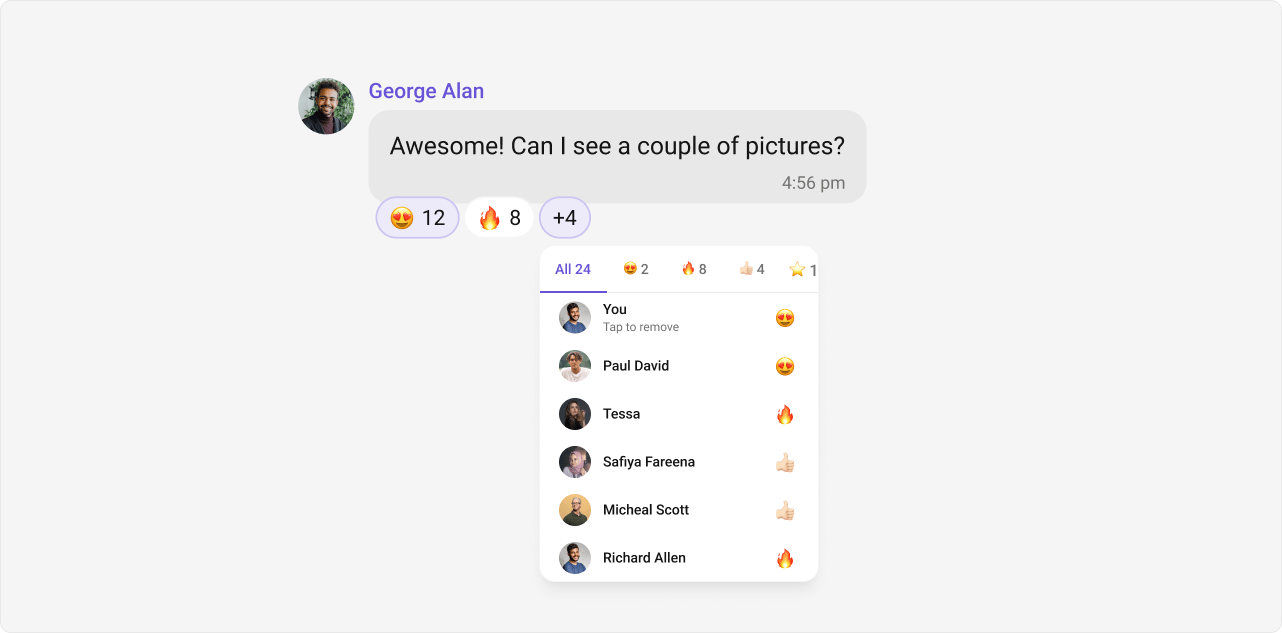 | Component | Functionality |
| -------------------------------------------------------------------------------- | ------------------------------------------------------------------------------------------ |
| [cometchat-message-list](/ui-kit/angular/v5/components/cometchat-message-list) | Renders reaction indicators on message bubbles and provides the reaction picker action. |
| [cometchat-reactions](/ui-kit/angular/v5/components/cometchat-reactions) | Displays the reaction bar beneath a message bubble showing all reactions and their counts. |
| [cometchat-reaction-list](/ui-kit/angular/v5/components/cometchat-reaction-list) | Shows the full list of users who reacted to a message, grouped by reaction type. |
| [cometchat-reaction-info](/ui-kit/angular/v5/components/cometchat-reaction-info) | Displays a tooltip or popover with details about a specific reaction on hover. |
## Mentions
Mentions allow users to directly address specific individuals in a conversation using `@username`. The feature also supports `@all` to notify every member in a group chat simultaneously.
| Component | Functionality |
| -------------------------------------------------------------------------------- | ------------------------------------------------------------------------------------------ |
| [cometchat-message-list](/ui-kit/angular/v5/components/cometchat-message-list) | Renders reaction indicators on message bubbles and provides the reaction picker action. |
| [cometchat-reactions](/ui-kit/angular/v5/components/cometchat-reactions) | Displays the reaction bar beneath a message bubble showing all reactions and their counts. |
| [cometchat-reaction-list](/ui-kit/angular/v5/components/cometchat-reaction-list) | Shows the full list of users who reacted to a message, grouped by reaction type. |
| [cometchat-reaction-info](/ui-kit/angular/v5/components/cometchat-reaction-info) | Displays a tooltip or popover with details about a specific reaction on hover. |
## Mentions
Mentions allow users to directly address specific individuals in a conversation using `@username`. The feature also supports `@all` to notify every member in a group chat simultaneously.
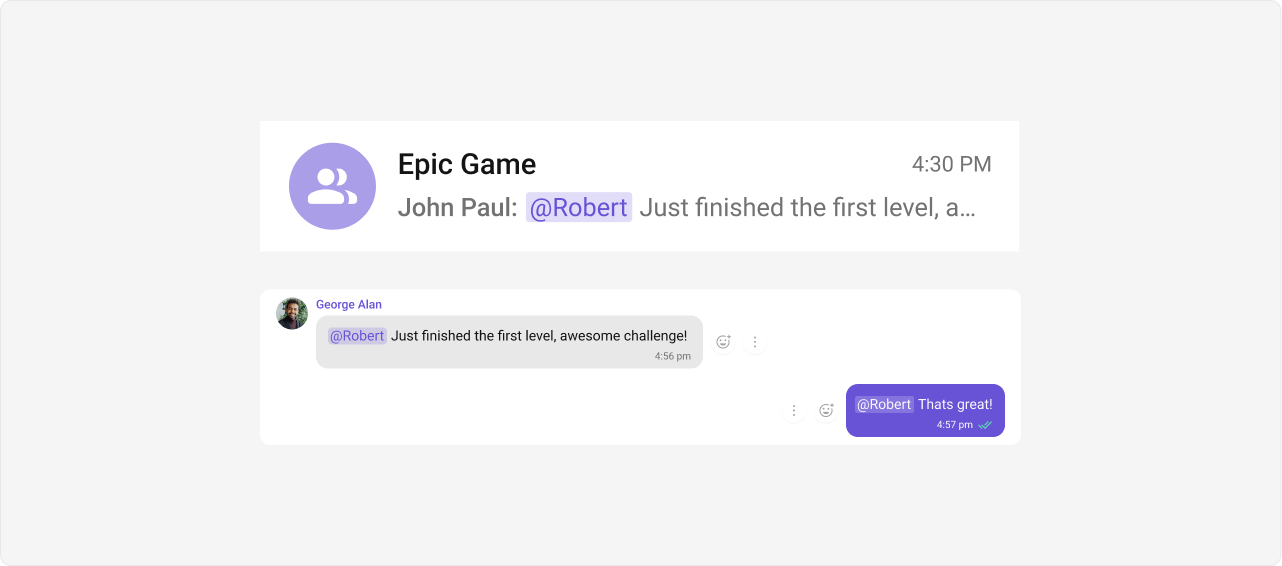 | Component | Functionality |
| -------------------------------------------------------------------------------------- | ------------------------------------------------------------------------------------------------------ |
| [cometchat-conversations](/ui-kit/angular/v5/components/cometchat-conversations) | Shows mention indicators in conversation list items so users can see where they were mentioned. |
| [cometchat-message-composer](/ui-kit/angular/v5/components/cometchat-message-composer) | Provides the mention picker that appears as users type `@`, allowing them to select a user to mention. |
| [cometchat-message-list](/ui-kit/angular/v5/components/cometchat-message-list) | Renders mention highlights within message text, making mentioned names visually distinct. |
## Threaded Conversations
Threaded Conversations enable users to respond directly to a specific message, keeping discussions organized and maintaining context — especially useful in group chats.
| Component | Functionality |
| -------------------------------------------------------------------------------------- | ------------------------------------------------------------------------------------------------------ |
| [cometchat-conversations](/ui-kit/angular/v5/components/cometchat-conversations) | Shows mention indicators in conversation list items so users can see where they were mentioned. |
| [cometchat-message-composer](/ui-kit/angular/v5/components/cometchat-message-composer) | Provides the mention picker that appears as users type `@`, allowing them to select a user to mention. |
| [cometchat-message-list](/ui-kit/angular/v5/components/cometchat-message-list) | Renders mention highlights within message text, making mentioned names visually distinct. |
## Threaded Conversations
Threaded Conversations enable users to respond directly to a specific message, keeping discussions organized and maintaining context — especially useful in group chats.
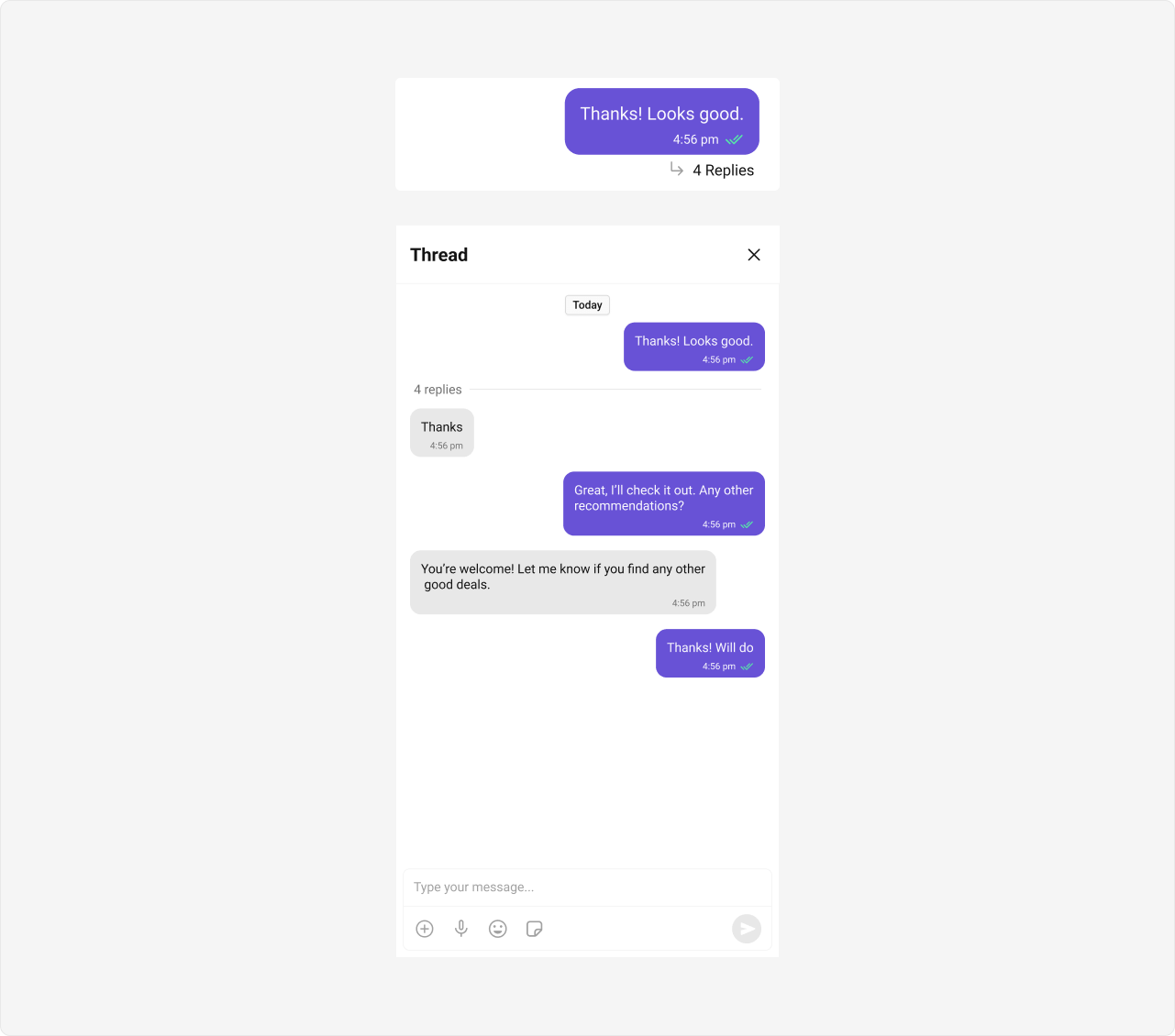 | Component | Functionality |
| -------------------------------------------------------------------------------------- | ----------------------------------------------------------------------------------- |
| [cometchat-thread-header](/ui-kit/angular/v5/components/cometchat-thread-header) | Displays the parent message along with the reply count at the top of a thread view. |
| [cometchat-message-list](/ui-kit/angular/v5/components/cometchat-message-list) | Renders thread replies when `parentMessageId` is set. |
| [cometchat-message-composer](/ui-kit/angular/v5/components/cometchat-message-composer) | Sends replies within a thread when `parentMessageId` is set. |
## Group Chat
CometChat facilitates group conversations, allowing multiple participants to communicate simultaneously — ideal for team collaborations, group discussions, and social communities.
| Component | Functionality |
| -------------------------------------------------------------------------------------- | ----------------------------------------------------------------------------------- |
| [cometchat-thread-header](/ui-kit/angular/v5/components/cometchat-thread-header) | Displays the parent message along with the reply count at the top of a thread view. |
| [cometchat-message-list](/ui-kit/angular/v5/components/cometchat-message-list) | Renders thread replies when `parentMessageId` is set. |
| [cometchat-message-composer](/ui-kit/angular/v5/components/cometchat-message-composer) | Sends replies within a thread when `parentMessageId` is set. |
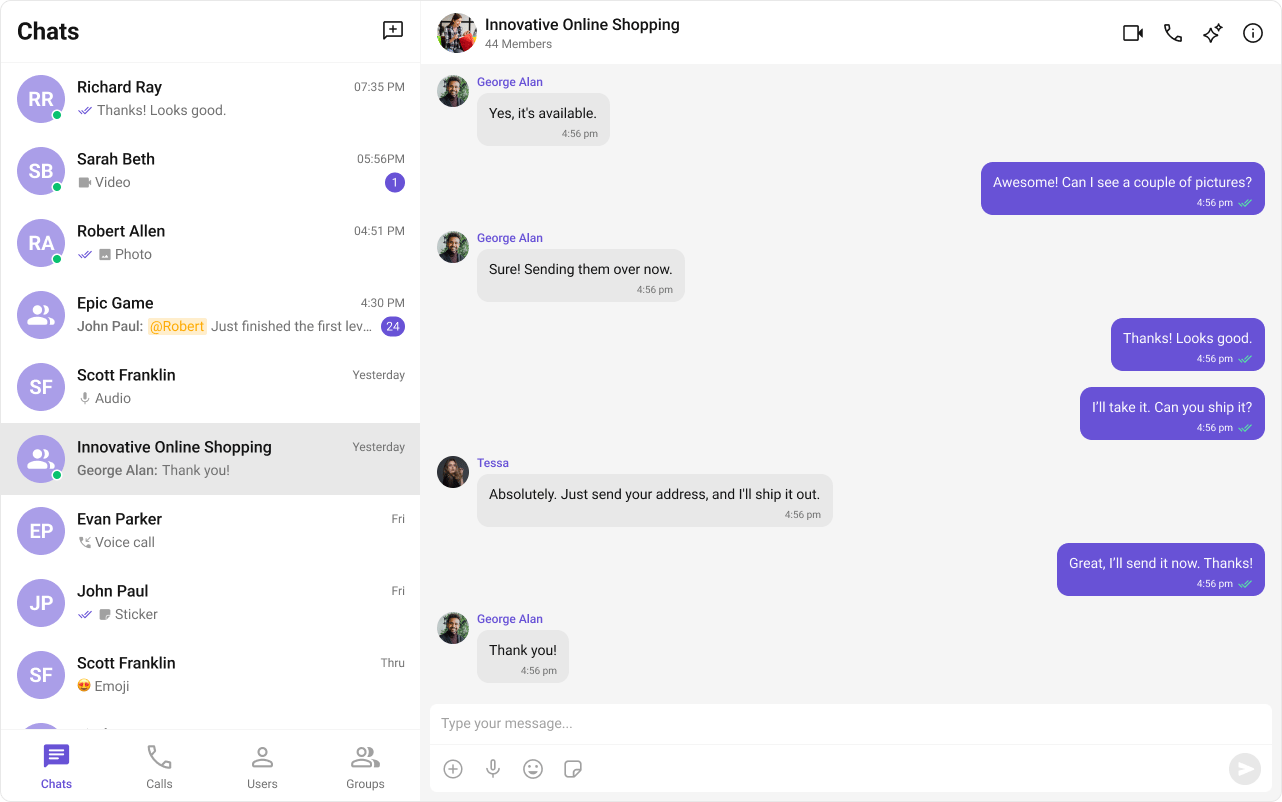
## Group Chat
CometChat facilitates group conversations, allowing multiple participants to communicate simultaneously — ideal for team collaborations, group discussions, and social communities.
 | Component | Functionality |
| -------------------------------------------------------------------------------- | ------------------------------------------------------------------------------------ |
| [cometchat-groups](/ui-kit/angular/v5/components/cometchat-groups) | Renders the list of available groups with search, join, and create capabilities. |
| [cometchat-group-members](/ui-kit/angular/v5/components/cometchat-group-members) | Displays the members of a group with roles, presence status, and management actions. |
***
## Next Steps
Browse all available Angular UIKit components
Customize the look and feel of your chat UI
Add audio and video calling
Explore AI-powered chat capabilities
| Component | Functionality |
| -------------------------------------------------------------------------------- | ------------------------------------------------------------------------------------ |
| [cometchat-groups](/ui-kit/angular/v5/components/cometchat-groups) | Renders the list of available groups with search, join, and create capabilities. |
| [cometchat-group-members](/ui-kit/angular/v5/components/cometchat-group-members) | Displays the members of a group with roles, presence status, and management actions. |
***
## Next Steps
Browse all available Angular UIKit components
Customize the look and feel of your chat UI
Add audio and video calling
Explore AI-powered chat capabilities